

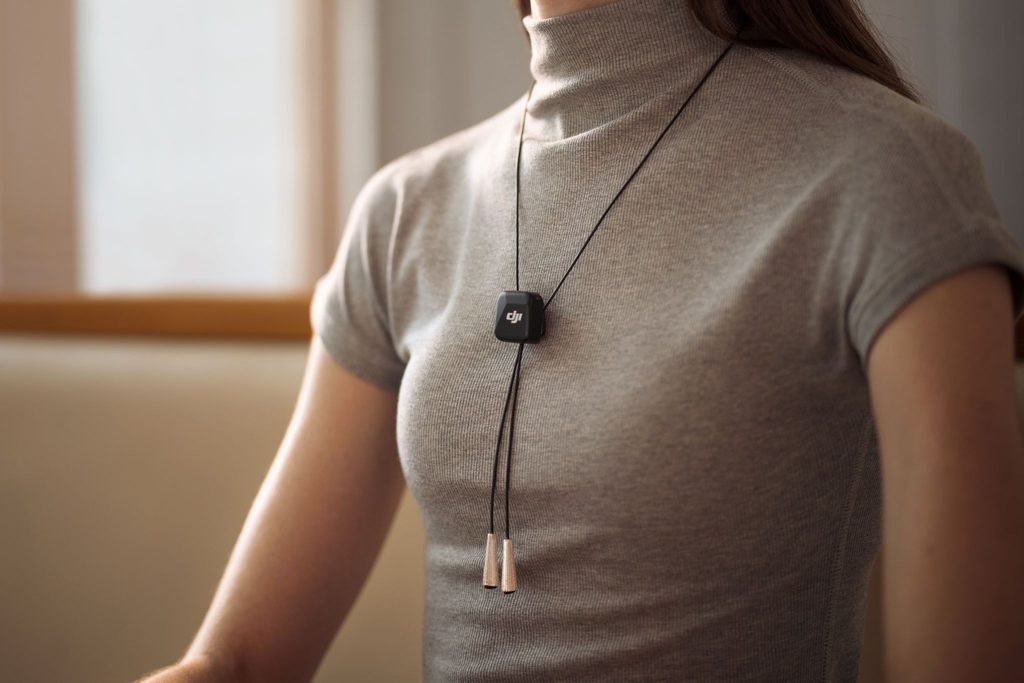
A good teaching microphone should almost disappear once a session begins. The presenter should be able to walk towards a whiteboard, turn to demonstrate a piece of equipment, speak to people at the back of the room and use both hands without constantly thinking about microphone position.
That is where wireless audio becomes useful. But choosing a system for teaching is not simply a matter of looking for the longest advertised transmission range. For classrooms, demonstrations and workshops, comfort, consistent voice level, noise control, battery life and a reliable backup recording can matter much more.
First Decide Whether You Need Amplification, Recording or Both
A wireless microphone does not automatically make a teacher louder in the room. It captures and transmits the voice to another device.
If the goal is amplification, the receiver needs to feed a compatible PA system, mixer or other audio setup. If the goal is to record a lesson, webinar or demonstration, it might instead connect to a camera, computer or smartphone.
Many workshops need both. The presenter may need reinforcement for the audience in the room while a camera records the session for people watching later.
That distinction should be sorted out before buying equipment. A wireless microphone is most useful when its connection options suit the rest of the teaching setup rather than forcing the presenter to redesign the room around the microphone.
Keep the Microphone Close to the Speaker
The biggest advantage of wearing a transmitter is consistency.
A camera-mounted microphone can sound acceptable while the presenter stands directly in front of the camera. Walk to the other side of the room, turn towards a display or lean over a demonstration table, and the voice quickly becomes more distant while room reflections become more obvious.
A wearable transmitter moves with the speaker. Clip it at roughly chest level, avoid covering it with loose fabric, and the distance between the voice and microphone stays much more consistent.
This also helps when filming practical demonstrations. A cooking instructor, art teacher or technical trainer can use both hands while continuing to explain what they are doing.
Do Not Treat Maximum Range as Normal Classroom Range
Transmission-distance specifications can be useful, but they are easy to misinterpret.
Rooms contain people, walls, wireless networks, computers and other sources of interference. A manufacturer’s maximum range is typically measured under much cleaner conditions than a busy education or conference venue.
For teaching, the more useful question is whether the connection remains dependable while the presenter moves around the actual room. Test the system before participants arrive, particularly if the receiver will be positioned behind equipment or far from the teaching area.
Whenever the session is important enough that it cannot simply be repeated, local recording on the transmitter adds another layer of protection.
DJI Mic Mini Fits the Way Teachers Actually Move
For a single teacher, trainer or demonstrator, DJI Mic Mini is a particularly practical starting point.
DJI Mic Mini is designed to be small and ultralight, so it adds very little bulk to a shirt, jacket or other suitable clothing. That matters during a full-day course: a microphone that feels awkward is more likely to be repositioned, removed or accidentally knocked out of place.
If local backup recording is an important part of the workflow, DJI Mic Mini 2S is the stronger fit. It supports internal recording, including 32-bit float, giving teachers and production teams another audio file to work with when a lesson, webinar or demonstration cannot easily be repeated.
For workshops, that backup can be more useful than an extreme transmission-distance figure. If a wireless connection is briefly interrupted, the locally recorded file gives an editor another source to work with.
The 32-bit float option is also useful when speaking volume varies significantly. A trainer might speak normally for most of a lesson, then suddenly raise their voice while addressing someone across the room. It provides greater flexibility when recovering level differences in post-production, although it cannot fix poor microphone placement or physical distortion at the microphone itself.
Managing Background Noise Without Making Speech Sound Artificial
Teaching spaces are rarely silent. Air conditioning, projectors, audience movement and equipment used during demonstrations can all compete with speech.
DJI Mic Mini provides two levels of noise cancelling, allowing background reduction to be adjusted rather than applying one aggressive setting to every environment.
For teaching, clarity should normally take priority over making the voice sound unusually processed. In a relatively quiet classroom, lighter noise reduction may preserve a more natural sound. Stronger reduction becomes more useful in a workshop with machinery, ventilation or continuous ambient noise.
DJI Mic Mini 2S is another useful option when the recording itself needs more protection. Its adjustable noise reduction and 32-bit float internal recording can help in challenging teaching environments while giving more flexibility when speaking levels change unexpectedly.
Those are practical considerations when a presenter alternates between quiet explanation and more energetic demonstrations rather than speaking at exactly the same level all day.
Battery Life Matters More During Workshops Than Short Videos
A microphone that lasts through a ten-minute presentation is not necessarily suitable for training that runs from morning until late afternoon.
DJI Mic Mini is particularly attractive for long teaching days because DJI advertises up to 48 hours of operating time when the system is used with its charging case. Actual runtime still depends on the way the microphone is used, so battery planning should reflect the length of the session and the features you expect to keep enabled.
For workshops that run across several sessions, the charging case can also make it easier to top up the system between classes instead of relying on a single charge to cover the entire day.
When DJI Mic Mini 2S or DJI Mic 3 Makes More Sense
A solo trainer does not necessarily need the most feature-rich system. A workshop with two presenters, an instructor and participant, or a more demanding recording workflow is different.
DJI Mic Mini 2S is a practical step up when local backup recording and more recording-focused features matter. That can be useful for longer classes, webinars and demonstrations where a missed take is difficult to repeat.
DJI Mic 3 makes more sense when the session involves several presenters or a more complex production. A single Mic 3 receiver can connect to as many as four transmitters, while internal recording and integrated timecode make it better suited to multi-speaker and multi-camera workshop coverage.
For three or four people speaking at the same time, Mic 3 provides a more direct path because each presenter can have a dedicated transmitter within the same system. You still need to plan how the separate channels will be monitored, recorded and organised in post-production.
Match the System to the Session
For most teachers and solo workshop presenters, the priority should be simple: wear the microphone comfortably, keep the voice consistent while moving, choose enough battery life for the session and decide whether local backup recording is important to the workflow.
DJI Mic Mini is a strong fit for everyday classes, demonstrations and training sessions when low weight, simple operation, two-level noise cancelling and long battery life are the priorities.
DJI Mic Mini 2S is the step up when local backup recording and 32-bit float matter, while DJI Mic 3 is the stronger choice when several presenters need separate microphones or the session is being captured with a more complex production workflow.
Across these options, the most useful wireless microphone is not the one with the most impressive range figure. It is the one whose weight, recording features, battery life and channel needs match the session well enough that the presenter can stop thinking about audio and concentrate on teaching.
